
MeshCore Just Works
Most mesh radios are built for camping trips and small friend groups — and Meshtastic is great at that. Toss a few nodes in backpacks and you’ve got off-grid texting in the woods.
Cities, though, are a different beast: concrete, interference, distance, and lots of users. That’s where MeshCore steps in. Instead of a temporary chat network, it forms a permanent, city-scale communications grid where nodes don’t just talk — they route. The network is already active and reliable across Reno, Sparks, Carson City, Gardnerville, Fernley and Fallon, growing stronger every week. The more people who join, the better it works — so if you can mount a small antenna (or even just run a node indoors), you can help build a local network that keeps working long after cell service gives up.
You don’t have to abandon Meshtastic. Just try MeshCore and you’ll appreciate the difference. It’s the same hardware, just a better platform city wide.
This site is dedicated to resources geared towards education and expansion of the mesh. Reach out with any questions you may have or visit the resources below.
*Before You Flash Your Radio — Read This*
- Open the flasher using Google Chrome
- Find your radio via the search
- Plug your radio into your computer using a USB cable
- Select Companion Bluetooth (this is correct for almost everyone). The USB cable is only used to install the firmware.
- After flashing, your phone talks to the radio over Bluetooth
- Connect to the radio using the MeshCore app, go through the settings (gear icon) and select USA/Canada in radio settings.
- Rename your radio if you’d like
- You’re done, send a message
Do NOT pick USB unless the radio will stay permanently connected to a computer.
Also:
Repeaters don’t chat — they only pass messages along for others.
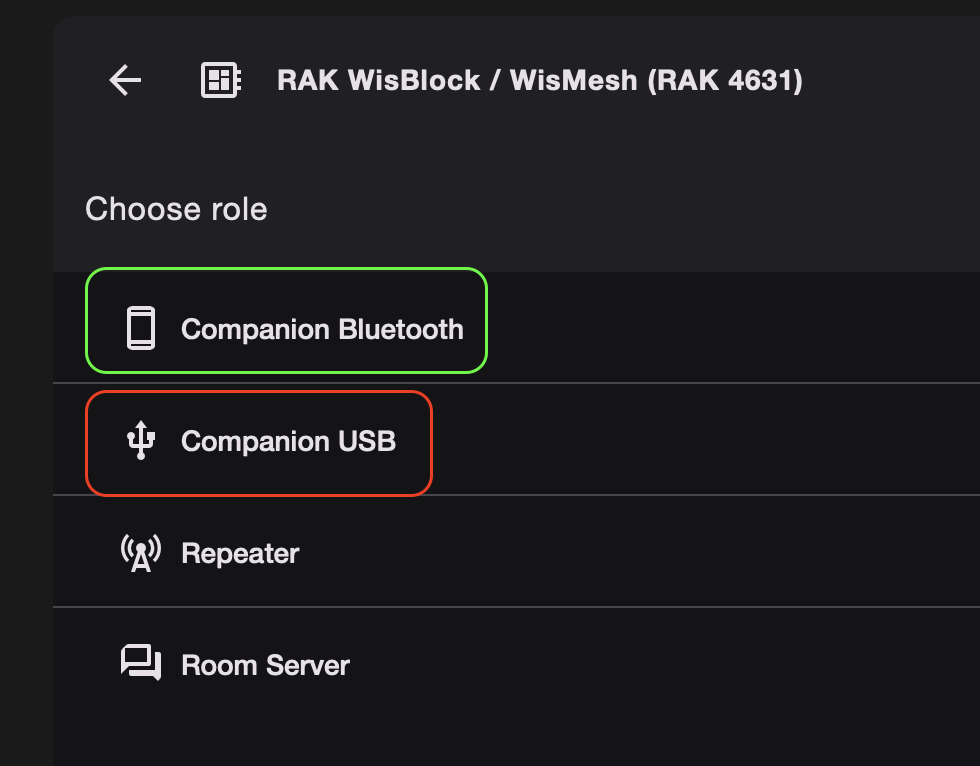
Companion radios allow you to talk to other radios on the mesh. Repeaters strengthen and expand the mesh. If you’re interested, get a second radio and this time choose the repeater option. When it’s done flashing, hit the USB configuration button and make sure to name it, choose a location, and select the North American frequency presets. This radio should effectively be stationary and as high as you can get it (roof, building, mountain top etc).
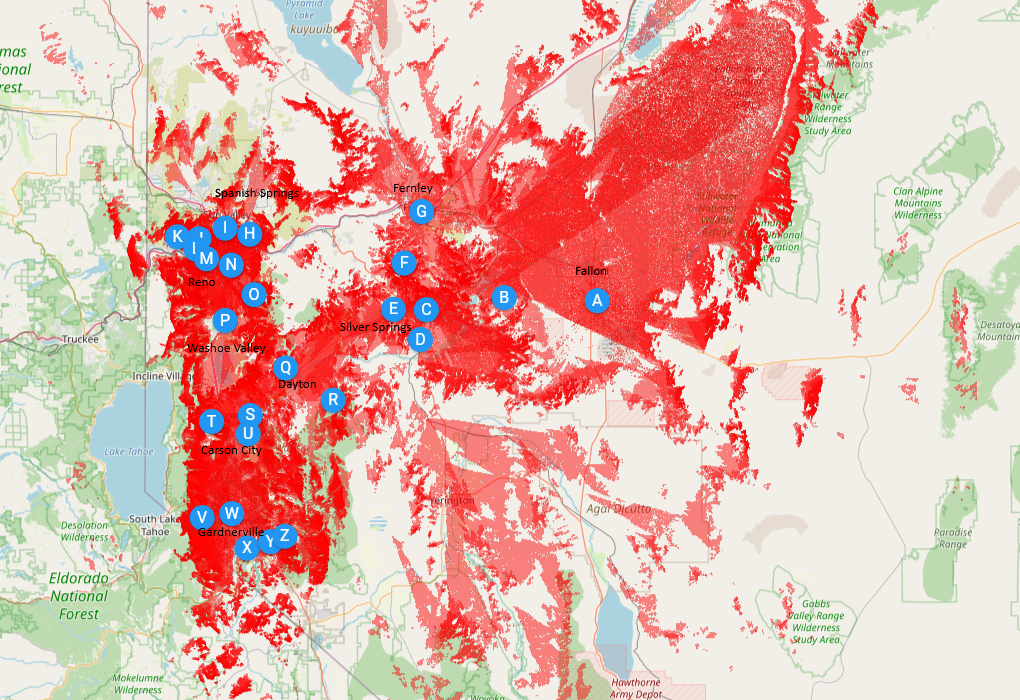
*Coverage Map*
Understand this map is calibrated to a 6 foot antenna height and that objects like trees, walls, hills and buildings seriously hamper reception and transmission efficiency. It’s also dependent on your particular radio setup, if you’ve got a little baby antenna, expect equivalent results. This isn’t a guarantee, it’s a good idea of what works in the real world. Just like a cell phone coverage map, there are places with dead spots, please be realistic.
Repeaters
Discord Members
Active Nodes
Help Us Grow
Every member makes it better.
Join the Discord
Flash a radio
Tell your friends
Tell Ed it works..
Have a question? Need help? Reach out below, you'll receive a response quickly!
Testimonials
“OMG MeshCore is so cool.”
Jesus Christ
“I never thought radio communication could be so reliable!”
George Washington
Founding Member
“Meshtastic was a cool toy, MeshCore is actually a useful tool..”
Abraham Lincoln
Chief Technical Officer